
You can write the best content on the internet, and it still won’t matter if search engines can’t find it. That’s the part nobody tells you when you first launch a website. You spend weeks getting the design right, picking a theme, writing your first few posts, and then you wait for traffic that never really shows up. Most of the time the problem isn’t the writing or the design at all. It’s that Google doesn’t even know large parts of your site exist, or it knows and has decided not to bother indexing them.
Google Search Console is the free tool built specifically to close that gap. It’s been around for years, it’s completely free, and yet most site owners barely scratch the surface of what it can actually do. A lot of people set it up once, glance at a chart, and never open it again. That’s a shame, because the data sitting inside it is some of the most useful information you’ll ever get about your own website, straight from the source that decides whether people find you or not.
This article walks through exactly how to use Search Console to get discovered, get indexed properly, and start climbing in the rankings. No fluff, no vague advice like “create quality content” without explaining what that actually means in practice. Just the steps, in order, the way you’d actually work through them.
What Search Console Is Really Doing Behind the Scenes
Think of Search Console as a direct conversation between your website and Google. It’s not an analytics tool in the way people usually mean that phrase. Analytics tools tell you what visitors did once they arrived. Search Console tells you what happened before that, during the part where Google decided whether to show your page at all.
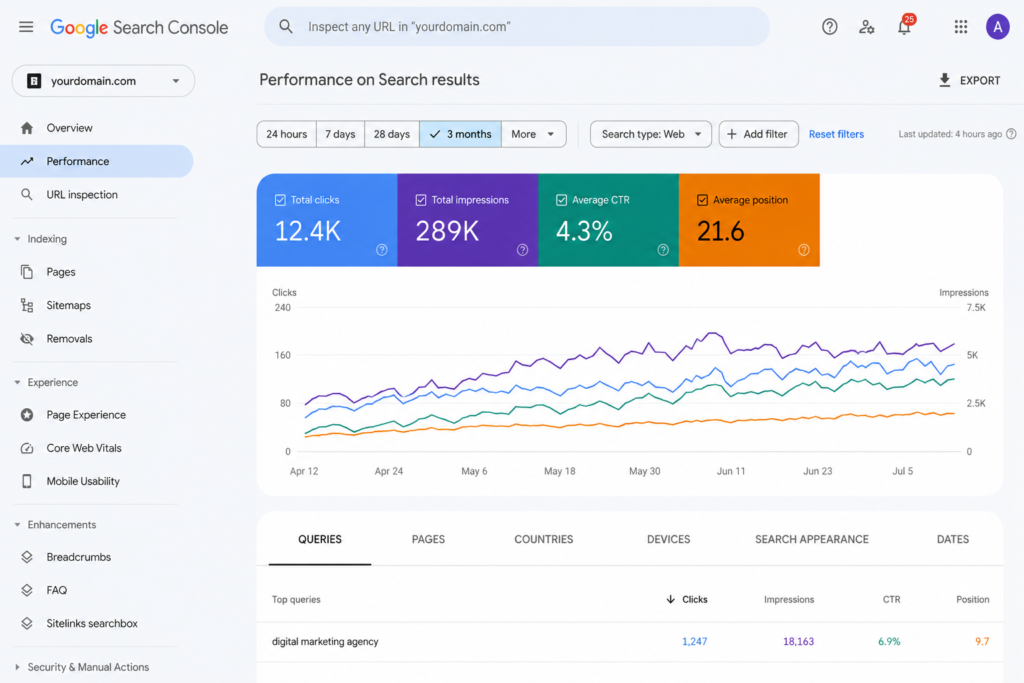
There are really three things this tool tells you that nothing else does with the same accuracy. First, it shows you how Google sees your site technically: which pages got crawled, which ones made it into the index, and which ones Google looked at and quietly skipped. Second, it shows you the real search queries that are actually bringing people to your pages, not guesses or keyword tool estimates, but the literal words people typed before clicking through. Third, it flags the technical problems that are holding pages back, things like broken links, slow load times, or duplicate content issues you might never notice just by browsing your own site.
Without this information, running a website is basically guesswork dressed up as strategy. With it, you’re reacting to real signals instead of hoping something works.
Getting Verified the Right Way
Before you can see any of this data, you need to prove ownership of the site, and the method you choose here actually matters more than most beginner guides let on.
The strongest option is domain property verification, done through a DNS record added at your domain registrar. The reason this one is better than the alternatives is that it automatically covers every version of your site under one property. That means http and https, www and non-www, all in the same place. If you’ve ever looked at Search Console data before and felt like the numbers seemed low or incomplete, there’s a good chance it’s because your site was split across two or three separate unverified properties without you realizing it.
The other common method is uploading an HTML verification file or adding a meta tag to your homepage. This works fine, but it only covers the exact subdomain and protocol you set it up on. If your site sometimes loads as www.yoursite.com and sometimes as yoursite.com without a redirect in place, you’ll need to verify both separately, and your traffic data will be split between them unless you merge things later. If you already went this route months ago, it’s still worth adding the domain property on top of it so you’re not missing anything.
Cleaning Up Your Sitemap Before You Submit It
Every beginner guide tells you to submit your sitemap. Almost none of them tell you that submitting a messy sitemap can actually work against you.
Before you hit submit, take a few minutes to go through what’s actually in that file. Pull out any URLs that redirect somewhere else, anything that returns a 404 error, and any page you’ve deliberately marked as noindex. What’s left should only be the canonical version of each page, not duplicate URLs with tracking parameters tacked on the end, since those confuse Google about which version it should actually treat as the real one.
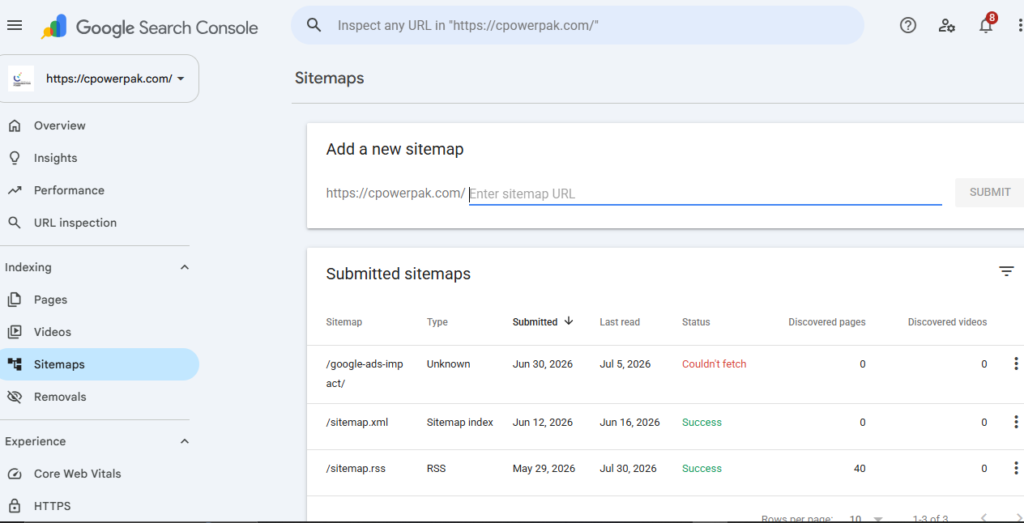
If your site runs on WordPress, plugins like Yoast or RankMath handle sitemap generation automatically and keep it updated as you publish, which saves you from having to manually manage this every time. Once your sitemap is clean, submit it under the Sitemaps section in the left sidebar of Search Console. Give it a day or two, then come back and compare the number of URLs Google says it “discovered” against the number you actually submitted. If there’s a noticeable gap between those two figures, that’s usually your first clue that something on the technical side needs attention.
Stop Waiting Around, Use URL Inspection
Google will eventually crawl your new content on its own schedule, but there’s no good reason to just sit there hoping it happens soon. Every time you publish something new, or make a significant update to an existing page, there’s a faster way to get in front of the queue.
Paste the URL into the URL Inspection tool, which sits near the top of the Search Console interface. It’ll show you whether the page is currently indexed, and if it’s not, it usually tells you why. From there you can click Request Indexing, which pushes that specific URL into Google’s crawl queue ahead of its normal schedule. To check either your page is indexed or not enter “site:yourdomain” in google to see your indexed page
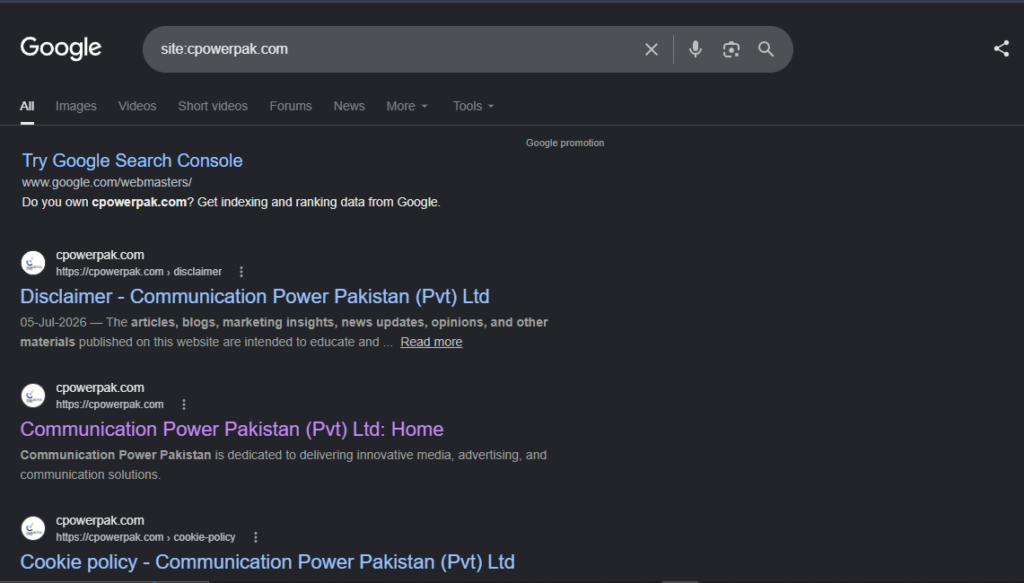
This doesn’t guarantee the page will rank well, and it doesn’t happen instantly either. What it actually does is remove the earliest and most common bottleneck, which is Google simply not being aware the page exists yet. That alone solves a huge chunk of the “why isn’t my new post showing up” problem people run into.
And if you ever notice clicks dropping off a cliff overnight, check the Pages tab and the Dates tab side by side before assuming the worst. A sharp single-day drop is far more often caused by something technical, like a bad site update or an accidental change to your robots.txt file, than it is by some kind of ranking penalty. Ruling out the technical explanation first will save you a lot of unnecessary panic.
Fixing Coverage Problems Before They Stack Up
Under the section labeled Pages, which used to be called Coverage in older versions of the tool, Google sorts every URL on your site into groups based on whether it’s indexed and, if not, exactly why.
A few of these are worth acting on the moment you see them. “Crawled, currently not indexed” means Google actually visited the page but decided against including it in the index, usually because the content felt thin or too similar to something else already on your site. The fix here isn’t to keep resubmitting the same page over and over. It’s to go back and genuinely improve it, make it longer, more specific, more useful than what’s already out there.
“Duplicate without user-selected canonical” shows up when you have multiple URLs on your site that look nearly identical to each other, and Google has picked one to treat as the “real” version without asking you first. Adding explicit canonical tags to your pages hands that decision back to you instead of leaving it to guesswork.
“Soft 404” is a sneaky one. It means the page technically returns a normal 200 status code, but Google’s systems have decided the content is effectively empty or useless anyway. This tends to show up a lot on category pages with nothing in them yet, or on old listings that expired without being cleaned up.
Beyond coverage itself, the Core Web Vitals and Mobile Usability reports matter more than people give them credit for. A page can have fantastic content and still get passed over simply because it loads too slowly or renders poorly on a phone. Google has made it pretty clear over the years that page experience is part of the equation now, not just an afterthought.
Reading the Performance Report Like You Mean It
This is where a lot of people stop too early, mostly because the report looks simple on the surface. It shows queries, clicks, impressions, click-through rate, and average position. The real value shows up once you start cross-referencing these numbers against each other instead of looking at them one at a time.
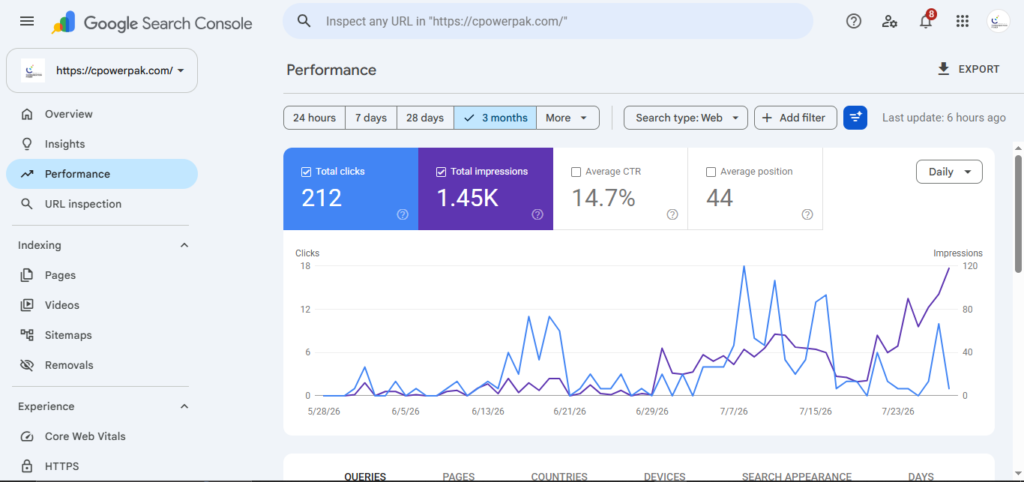
Say a page has a lot of impressions but very few clicks. That page is showing up in search results, people are seeing it, but they’re scrolling right past it. Nine times out of ten this points to a title tag or meta description that doesn’t match what the person searching actually expected to find. The fix here is usually to rewrite the title so it directly reflects the query showing up in that report, rather than something clever or vague.
Now say a page has a great average position, maybe top three, but almost no impressions at all. That means you’re ranking well for a phrase that hardly anyone is actually typing into Google. Open the Queries tab filtered to just that page and think about whether it should be retargeted toward a phrase people search for more often, even if it means adjusting the headline or the framing of the content itself.
Links Matter More Than People Realize, Both Kinds
The Links report tends to get ignored, which is a mistake. It shows two different things that are both genuinely useful. One is your top linking pages from other websites, which is a good way to notice which pieces of your content naturally attract attention from other sites so you can create more content in that same direction.
The other is internal link counts across your own site. Pages that have very few internal links pointing to them are effectively orphaned as far as Google is concerned, even if they’re technically sitting right there in your navigation menu. A quick and genuinely useful exercise is sorting your pages by internal link count, finding the important ones sitting near the bottom of that list, and adding a handful of contextual links to them from pages on your site that already get decent traffic.
A Word About AdSense Approval
If part of the reason you’re doing all this is to get approved for AdSense or a similar ad network, Search Console helps here too, just indirectly. Reviewers, and the automated systems behind the scenes, tend to favor sites that are properly indexed, largely free of coverage errors, mobile friendly, and showing a real pattern of organic search traffic rather than traffic that’s mostly paid or referred from social media.
That said, clean data in Search Console is a signal that your site is well maintained. It isn’t a shortcut around the actual requirement, which is original content that genuinely serves whoever’s reading it, a clear privacy policy, an about page that explains who’s behind the site, and no lingering policy violations sitting somewhere in the background. Treat Search Console as the diagnostic tool that helps you meet those standards, not as something that replaces the work of actually meeting them.
Building a Routine You’ll Actually Stick To
Search Console rewards consistency far more than it rewards a one-time setup followed by neglect. A routine that’s realistic to maintain looks something like this.
Once a week, scan the Performance report for pages that have high impressions but a disappointing click-through rate, and rewrite a title or two based on what you notice. Every time you publish something new, run it through URL Inspection and request indexing right away instead of waiting. Once a month, check the Pages report for any new coverage issues and take a look at the Links report to see which pages need more internal linking. Every few months, go back through your sitemap and clear out anything that’s outdated, redirected, or no longer relevant.
None of this requires advanced technical knowledge or expensive tools. It just requires actually paying attention, and Search Console gives you the exact data that tells you where to point that attention.
Getting found by your audience isn’t something you set up once and then forget about. It’s an ongoing back and forth between your site and the search engine trying to make sense of it, and that conversation changes as your content changes, as competitors publish new things, and as Google’s own systems evolve. Search Console is where that conversation actually plays out. The more comfortable you get reading it, understanding what it’s telling you, and acting on what you find, the more of your audience ends up finding their way to you without you having to chase them down.
Learn more about How to Optimize Your Google Business Profile: Complete Guide to know how to create google business profile and how to list your business on Google maps as well How to Set Up Google Analytics 4 for Your Website in 2026 to monitor your business performance.