
If you run paid search campaigns, you have probably already seen the phrase “AI Max” sitting inside your Google Ads dashboard, or you have read about it in an industry newsletter and wondered whether it is something you actually need to worry about. The short answer is yes, you do need to understand it, because Google is not treating this as an optional side feature anymore. It has become the default direction for Search campaigns, and Google is actively migrating advertisers toward it whether they ask for it or not.
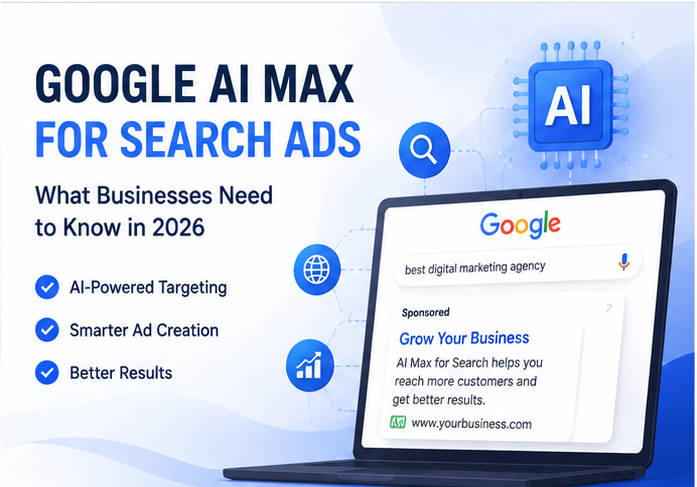
This article walks through everything a business owner, marketing manager, or in house PPC person needs to know about AI Max for Search in 2026. What it is, how it actually works under the hood, what changed since it left beta, how it compares to Performance Max and Dynamic Search Ads, what controls you still have, the migration timeline you need to be aware of, and a practical way to test it without blowing up your account.
What AI Max for Search Actually Is
The first thing to clear up, because it confuses almost everyone at first, is that AI Max is not a new campaign type. You will not create an “AI Max campaign” the way you create a Search campaign or a Performance Max campaign. Instead, AI Max is an optimization layer that sits on top of your existing Search campaigns. You turn it on inside a Search campaign you already have, and it changes how that campaign finds queries, builds ad copy, and chooses landing pages.
Google describes it as a suite of targeting and creative enhancements built directly into Search campaigns, and that description is fairly accurate. It is not a separate silo like Performance Max, where your budget gets spread across Search, Display, YouTube, Gmail, Discover, and Maps with very little visibility into where the money went. AI Max keeps you inside the Search channel and inside the campaign structure you already built. What changes is how aggressively Google’s models are allowed to expand beyond your literal keyword list and how much of your ad copy and landing page selection gets automated.
AI Max launched into beta in 2025 and officially moved out of beta in April 2026. Since then Google has been steadily adding new controls and pushing more advertisers onto it, including replacing older automation tools like Automatically Created Assets and Campaign level Broad Match with AI Max equivalents.
The Core Features
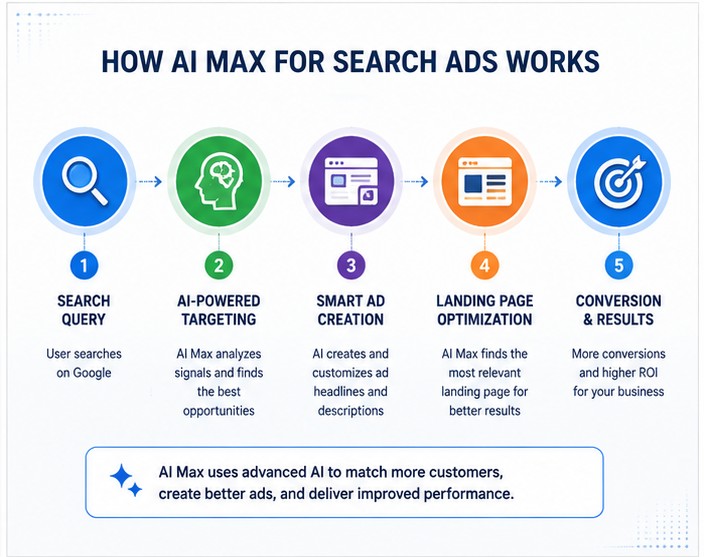
AI Max is really built around three main capabilities, and understanding each one separately makes the whole system much easier to reason about.
Search Term Matching
This is the targeting side of AI Max. Rather than relying purely on your keyword list and match types, AI Max uses broad match logic combined with what Google calls keywordless technology to identify queries related to your business that you might not have thought to bid on. It pulls in signals from your website, your existing keywords, your past campaign performance, and real time context about the person searching, and then decides whether a given query is worth showing your ad against.
For businesses that already lean heavily on exact and phrase match keywords, this tends to be the feature with the biggest impact, because it opens up a much wider pool of queries than a tightly controlled keyword list ever could. Google’s own reporting has shown conversion uplift figures in the range of 7 percent for advertisers already using the full AI Max suite compared to search term matching alone, and considerably higher uplift, sometimes over 20 percent, for advertisers who were previously relying almost entirely on exact and phrase match.
Text Customization
This used to be called Automatically Created Assets, and it does what the old name suggests. Google’s AI writes headlines and descriptions based on your existing ads, your landing pages, your other assets, and the keywords in the ad group. The goal is to produce ad copy that is more relevant to the specific query a person typed, rather than showing the same static headline to everyone.
You are not required to let this run completely unsupervised. You can set text guidelines, which let you exclude specific words or phrases and set messaging restrictions so the AI generated copy stays within your brand voice and, importantly, within any regulatory language your industry requires.
Final URL Expansion
This is the landing page side of things. Instead of always sending traffic to the final URL you specified in your ad, AI Max can choose a different, more relevant page on your domain if it believes that page will convert better for a given query. A retailer running ads for a broad product category might get some of that traffic routed to a more specific product page instead of the category landing page.
Final URL expansion depends on text customization being turned on, so you cannot use one without the other. You can restrict which pages are eligible by excluding specific URLs or entire sections of your site, and at the ad group level you can also add URL inclusions to steer traffic toward specific pages you want prioritized.
What Control You Actually Keep
This is the part that worries most advertisers when they first hear about AI Max, and it is worth being precise about it because the concern is legitimate but often overstated.
AI Max operates inside the boundaries you already set. Your campaign goal, your bidding strategy, your budget, your conversion goals, your geographic targeting, and your negative keywords all still apply. AI Max does not override your bid strategy or spend outside your budget. What it changes is which queries within those boundaries get matched and what the ad and landing page look like for those matches.
Beyond the baseline campaign settings, Google has added a growing list of controls specifically for AI Max as advertiser feedback rolled in:
Negative keywords still work and can be applied at the campaign or ad group level, same as before. If AI Max starts matching queries you do not want, adding them as negatives is still the primary way to rein it in.
Brand inclusions and exclusions let you control how your campaigns interact with brand related traffic, both your own brand and competitor brands, at both the campaign and ad group level.
Locations of interest give you a way to signal geographic intent more precisely than before, something that used to require very specific keyword construction.
Text guidelines let you set term exclusions and messaging restrictions for the AI generated ad copy, so you can stop it from using certain words or adopting a tone that does not match your brand.
URL exclusions and inclusions control which landing pages are eligible for final URL expansion, which matters a lot if parts of your website should never receive paid traffic, such as a blog, a careers page, or terms and conditions pages.
AI Brief, which launched in April 2026, is one of the more interesting additions. It lets you give AI Max natural language instructions about how it should generate ads and select queries, rather than only being able to tell it what not to do through exclusions. This is the first real attempt at letting advertisers positively shape the AI’s behavior instead of only fencing it in after the fact.
One issue that surfaced through 2025 and into 2026, and that is worth knowing about if you run a well known brand, is that AI Max’s intent based matching could sometimes route around literal negative keywords by matching on inferred intent rather than the exact text of the query. Analysis published in late 2025 found that brand inclusion and exclusion settings were missing misspellings and word variations that still triggered matches, which led to some cannibalization of dedicated branded campaigns and messier attribution. Google has since added more granular branded search controls, including an unbranded only toggle, specifically to address this.
Reporting and Transparency
Google has made a real effort to keep AI Max legible rather than turning it into a black box, and this is one area where it genuinely differs from Performance Max. You get:
A search terms report that shows the actual headlines and landing pages that were served for a given query, not just the query itself.
An optimized asset report that tracks the performance of AI generated assets against your actual KPIs like spend and conversions, not just impressions or clicks.
A landing pages report with a field showing when AI Max, rather than your original ad setup, selected the destination page.
A combination view in the Google Ads API that reports on performance for specific combinations of search term, headline, and landing page together, which is genuinely useful if you want to understand exactly which creative and page combination is driving results for which type of query.
The general advice from agencies working with AI Max day to day is to check the search terms report weekly, at minimum, especially early on. Expanded matching is only safe to run if someone is actually watching what it is matching.
AI Max for Search Versus Performance Max Versus Dynamic Search Ads
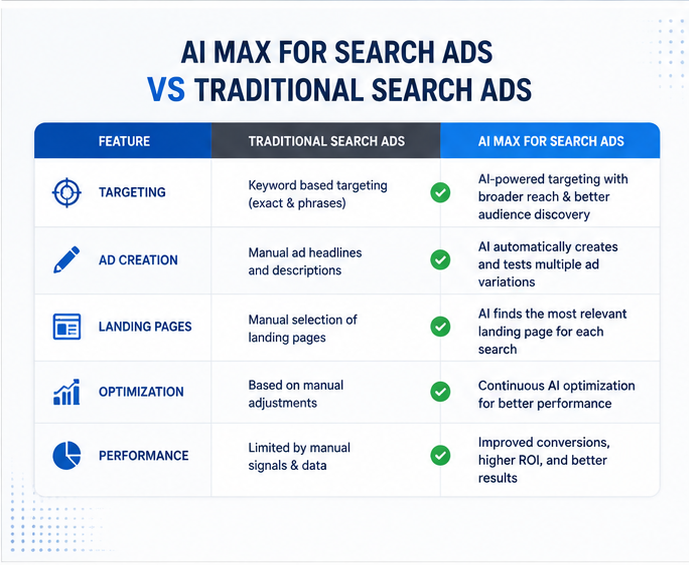
Advertisers frequently mix these three up, so it is worth laying out the distinction plainly.
Standard Search campaigns give you the most granular control. Keyword level targeting, tight negative keyword management, and precise intent matching. This is still the right choice for regulated industries, businesses with strict brand and compliance requirements, or anyone running a lean budget where every dollar of waste actually hurts.
AI Max for Search keeps you inside the Search channel and inside your existing campaign structure, but loosens the targeting boundaries to capture queries you were not reaching before. It is best suited to campaigns that are already performing well but have plateaued, where you have solid negative keyword lists and brand controls in place and you are willing to monitor search terms regularly.
Performance Max is a fundamentally different bet. It spreads your budget across every Google surface, Search, Display, YouTube, Gmail, Discover, and Maps, and lets Google’s bidding algorithm decide where to spend. It gives you the least control and the broadest reach. You do not get keyword level targeting, negative keyword management in the traditional sense, or the kind of intent precision that Search campaigns offer, so it complements AI Max rather than replacing it for most businesses.
Dynamic Search Ads, the older tool that used your website content to generate headlines and choose landing pages automatically, is being phased out in favor of AI Max. Google announced that DSA would be upgraded to AI Max, framing it as the same underlying benefit, using your website to generate relevant ads and pick pages, but with a more capable, real time system behind it that also incorporates broader intent signals rather than relying solely on landing page content.
The Migration Timeline You Need to Know
This is the part that actually requires action from most advertisers, because Google is not simply making AI Max available. It is actively retiring the older tools it replaces.
Advertisers using Campaign level Broad Match, Automatically Created Assets, or legacy DSA setups can no longer create new campaigns using those legacy configurations. Google has said it will migrate existing campaigns in place using equivalent AI Max settings, and that existing brand inclusions and exclusions will carry over automatically during that process.
The DSA migration timeline has actually shifted. Google originally set automatic migration to begin in September 2026, but on June 11, 2026, it extended that timeline, moving the automigration date out to February 2027 and restoring the ability to create new DSA campaigns starting June 15, 2026. So if you were told DSA was disappearing this fall, that has since been pushed back, and you have more runway than the original announcement suggested.
Separately, campaigns currently using text customization are scheduled to be upgraded to AI Max starting in September 2026.
Given how often these dates have already shifted once, the sensible approach is to check the official Google Ads help center or your account notifications for the current schedule rather than treating any specific date as fixed in stone, and to build in time to audit your account before any automatic migration reaches you.
If you have developers maintaining Google Ads API integrations, this matters even more, because the underlying API objects and fields for legacy Broad Match and ACA configurations are being deprecated alongside the UI changes, and integrations that are not updated can break when the migration reaches an account.
Should Your Business Actually Turn It On
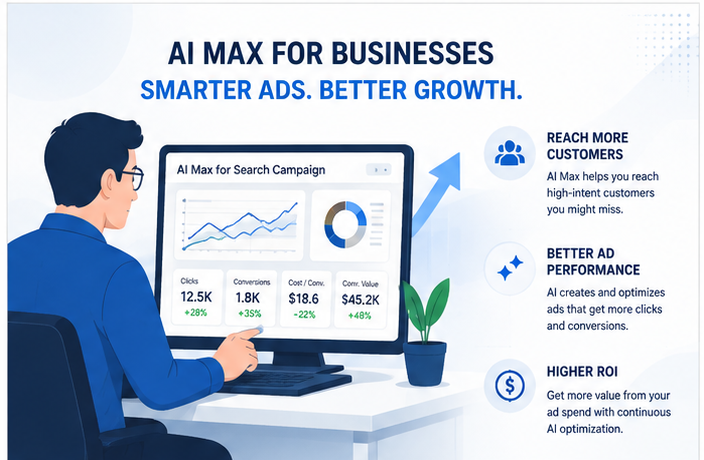
There is no universally correct answer here, and anyone who tells you to turn it on everywhere or avoid it entirely is oversimplifying. The honest answer depends on where your account already stands.
Turning it on tends to make sense when your Search campaign is already solid but has plateaued, when your negative keyword lists and brand controls are already in reasonably good shape, and when you or your agency have the bandwidth to actually review search terms and generated assets on a regular basis rather than setting it and forgetting it.
It makes less sense to rush into if you are in a heavily regulated industry with strict approved language requirements, if your brand voice is unusually specific and hard to replicate through AI generated copy, if you do not currently have the negative keyword hygiene to catch irrelevant expansion, or if your team does not have time to monitor the new reporting regularly.
Before increasing your advertising budget, you can estimate potential campaign performance with our Google Ads ROI Calculator.
A reasonable testing framework that several agencies have converged on looks roughly like this. Start by auditing your existing negative keywords and brand exclusions before you turn anything on, because AI Max will lean on whatever controls already exist. Then enable it on a single well established campaign rather than across the account, and run it alongside a comparable control campaign with AI Max disabled so you have something to compare against. Watch the search terms report weekly for the first month, add negatives as irrelevant matches show up, and review the AI generated headlines and descriptions to make sure they match your brand tone, pinning the ones that do. Only after that initial testing period should you consider expanding it to other campaigns, and even then it is worth doing it gradually rather than flipping the switch account wide in one move.
New Territory: AI Max for Shopping and Travel
As of May 2026, Google extended the AI Max approach beyond standard Search campaigns. Retailers now have access to AI Max for Shopping, which brings similar targeting and creative automation to Shopping campaigns, and Travel Ads are now available directly inside Search campaigns, bringing AI Max style capabilities to travel specific ad formats. If your business sells physical products or operates in travel, it is worth checking whether these newer formats are relevant to you specifically, since they are built on the same underlying philosophy but with format specific features.
How This Fits Into Google’s Broader AI Search Shift
It is worth zooming out for a moment, because AI Max did not appear in isolation. It is part of a broader shift in how Google Search itself works. AI Overviews and AI Mode are changing how people search and what a results page looks like, and Google has been explicit that AI Max is the primary mechanism connecting paid ads to those AI driven search experiences. Google’s own messaging around this describes Search becoming more exploratory and multimodal, moving beyond literal query matching toward predicting what someone might need next, and AI Max is the ad product built to operate inside that kind of search behavior rather than the older, more literal keyword based model.
Practically, this means landing page quality now matters even more than it used to. Google’s guidance and third party analysis both point toward the same conclusion: pages built around specific, concrete questions that real customers ask, with clean structure and accurate content, tend to perform better both in AI Max matching and in qualifying for placement within AI driven search surfaces. Product feeds need to be complete and current, and schema markup helps Google’s systems understand page context, which increasingly feeds into how well a page can be selected by final URL expansion or how it shows up in AI powered results generally.
Common Questions Businesses Ask
Does AI Max cost more to run? No, there is no separate fee for AI Max itself. It uses your existing bidding strategy and budget. The concern is not a direct cost increase but the possibility of wasted spend if expanded matching pulls in irrelevant queries that you have not excluded yet, which is why the testing and monitoring approach matters.
Will AI Max be forced on my account even if I do not opt in? For the specific legacy features it replaces, such as Campaign level Broad Match, Automatically Created Assets, and eventually Dynamic Search Ads, yes, Google has said it will migrate existing campaigns automatically over the announced timelines. For campaigns that are not using those legacy features, AI Max still needs to be manually enabled inside campaign settings.
Can I turn individual pieces off without disabling the whole thing? Yes. Search term matching, text customization, and final URL expansion can each be toggled independently in campaign or ad group settings, with the one dependency being that final URL expansion requires text customization to be active.
Does AI Max work with Target CPA or Target ROAS bidding? Yes. AI Max does not change your bidding strategy. It works alongside whichever strategy you have selected, whether that is Maximize Conversions, Target CPA, Target ROAS, or another option, and is meant to improve the quality of what feeds into that bidding rather than replace it.
Is AI Max the same thing as Performance Max? No. This is probably the single most common point of confusion. Performance Max is a separate campaign type that spans multiple Google properties and gives you far less granular control. AI Max stays inside your Search campaigns and keeps most of the traditional Search controls intact.
How do I know if AI Max is actually helping my account? Run it as a genuine test rather than assuming the outcome. Compare a campaign with AI Max enabled against a similar one without it, over a long enough window to account for normal fluctuation, and look at conversions and cost per conversion rather than surface metrics like impressions or clicks alone, since expanded reach on its own does not tell you whether the additional traffic actually converts.
What happens to my branded campaigns? This is worth watching closely. Because AI Max can expand into branded queries based on inferred intent rather than literal keyword matching, it has been known to pull traffic away from dedicated branded campaigns and inflate the cost of branded clicks. Google’s newer branded search controls, including campaign and ad group level brand lists and an unbranded only toggle, exist specifically to address this, so if you run a separate branded campaign it is worth reviewing those settings before enabling AI Max broadly elsewhere in the account.
The Bottom Line
AI Max for Search is not a fad feature that will quietly disappear. It represents the direction Google Ads is heading for Search campaigns broadly, and the older tools it replaces are already being sunset on a defined, if occasionally shifting, timeline. For most businesses the realistic question is not whether to eventually use it, since much of the transition will happen automatically regardless, but how carefully to manage the transition and how much manual oversight to keep in place once it is running.
The businesses that tend to do well with it are the ones that treat it the same way they would treat any significant account change: audit what you have before flipping the switch, test in a controlled way rather than everywhere at once, keep a close eye on the new reporting Google has provided, and use the growing list of controls, brand settings, text guidelines, URL exclusions, and AI Brief, to keep the automation working within boundaries you are actually comfortable with rather than assuming it will figure out your business on its own.